Identity & Access Management for Agentic AI — Our Technical Report Is Now Published

Over the past three+ months, my co‑author Angelika Steinacker and I have been deep in the weeds researching, brainstorming, threat‑modeling, and refining what a secure identity and access architecture should look like in the era of agentic AI. Today, I’m excited to share that our technical paper Governing AI Agents – An Agent-Aware IAM Framework, is now publicly available.

👉 Read it on ResearchGate: https://www.researchgate.net/publication/400396082_Governing_AI_Agents_An_Agent-Aware_IAM_Framework

Why we wrote this

Agentic AI systems introduce Autonomous Non‑Human Identities (A‑NHIs)—entities that operate with autonomy, make decisions at machine speed, and collaborate across applications, APIs, and other agents. These behaviors fall far outside what traditional IAM was designed to handle.

Across our research, we observed consistent gaps in current IAM systems:

  • Reliance on static credentials
  • Lack of fine‑grained, purpose‑aligned authorization
  • Limited visibility into multi‑hop agent delegation chains
  • No robust way to establish dynamic cross‑domain trust
  • Insufficient mechanisms for end‑to‑end provenance

What this paper contributes

We propose an Agent‑Aware IAM model built on extending and fully implementing the Identity Fabric. The result is a four‑layer deployment architecture designed specifically for agentic environments:

  1. Identity Foundation — verifiable agent identities, ephemeral issuance, ownership, and purpose metadata
  2. Trust & Federation — dynamic cross‑domain trust using VCs, DIDs, token exchange, and trust brokers
  3. Security & Privacy Enforcement — intent‑aligned authorization, JIT access, privacy safeguards, and drift detection
  4. Lifecycle & Observability — full provenance: agent → token → task → data → decision

We illustrate these layers through a credit‑scoring + order‑management multi‑agent system, showing how secure, audited flows can be constructed end‑to‑end.

A collaboration worth highlighting

This work came from months of intense technical deep‑dives, design sessions, and constant iteration. Collaborating with my co‑author Angelika Steinacker made this intellectually exciting and extremely rewarding — discussions ranged from identity proofs and decentralized trust to model attestation, SBOM linkage, and federated governance.

Looking ahead

As enterprises move toward multi‑agent ecosystems, we believe trust—not raw capability—will define what can scale safely. Identity, policy, and provenance must become the control plane for autonomous digital workflows.

As I mentioned in my previous blog post Rethinking Identity in the Age of Multi-Agent Systems, this is a very important field of study, within the Agentic AI Systems realm. And there will be more work we need to do, as Security Architects, to ensure these Agentic systems operate within boundaries we set for them.

Thank you to everyone who encouraged this work along the way.
I hope this Paper serves as a useful reference for Enterprise Security Architects, CISOs, IAM teams, and AI governance practitioners navigating this emerging space.

Rethinking Identity in the Age of Multi-Agent Systems

Over the past few months, a recurring theme has emerged in my conversations with enterprise architects and CxOs across industries: “how do we prepare for the identity explosion that autonomous systems are bringing”.

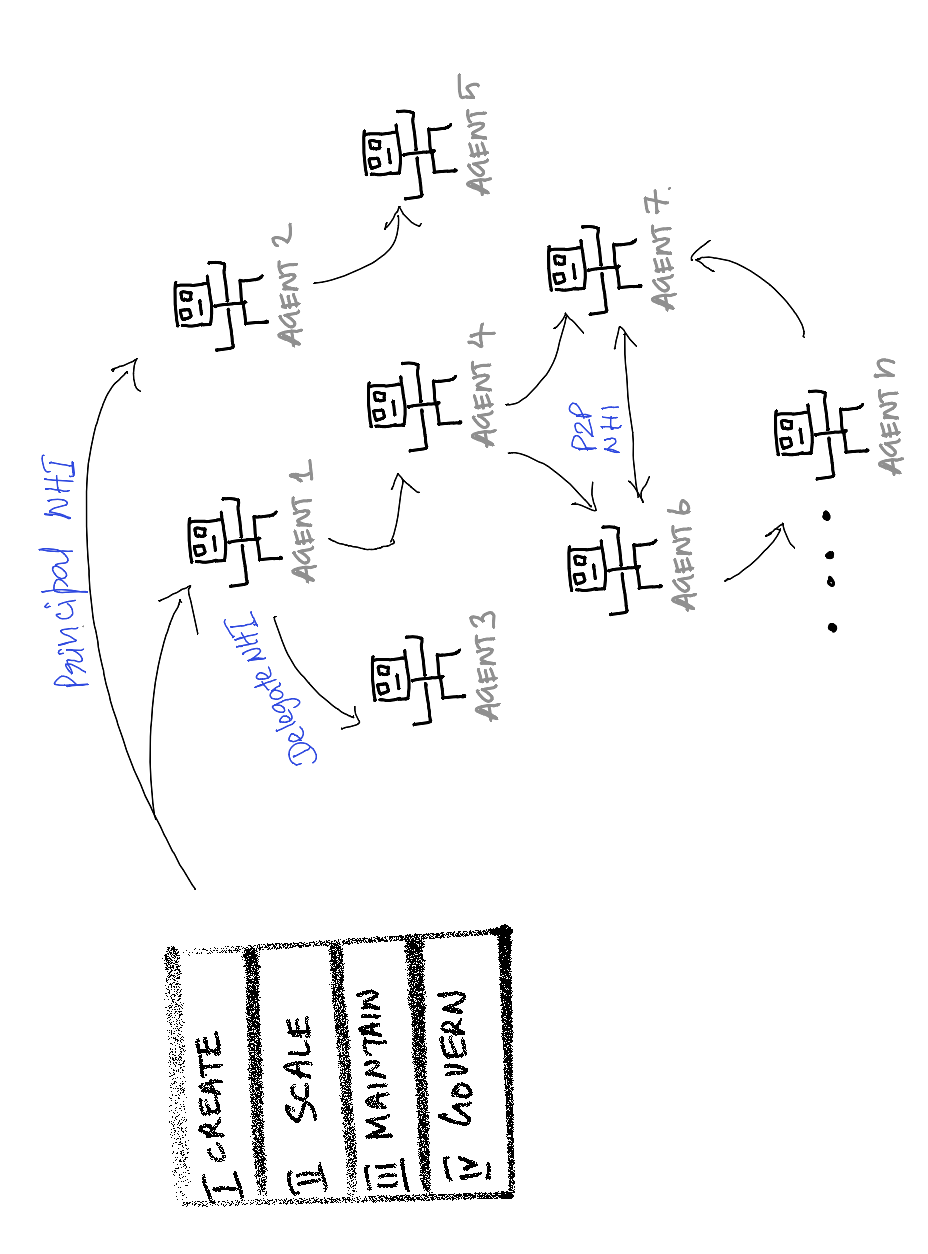
As organizations begin deploying multi-agent systems (MAS) — collections of AI agents collaborating across environments — the familiar boundaries of Identity and Access Management (IAM) are being tested. Our IAM foundations were built around humans and static services. In contrast, non-human identities (NHIs) — the agents themselves — are transient, autonomous, and capable of making complex decisions without direct human oversight.

Many of my peers in the industry are already seeing the cracks. CxOs express growing concern about compliance and auditability: “Who authorized that action if no human clicked approve?” , “Who’s accountable when an agent takes an action no human explicitly approved”. Enterprise architects talk about the operational strain of managing thousands of short-lived agent credentials — each spun up dynamically, each needing verifiable provenance and revocation. Security leads worry about a new kind of “shadow identity” risk, where agents operate outside the current IAM visibility model.

Why Traditional IAM Architectures are not suitable for Agentic Systems

Identity Persistence vs. Agent Ephemerality:
Conventional IAM systems rely on static or semi-persistent identities (users, service accounts, API keys). Agentic systems operate with ephemeral, rapidly instantiated agents whose lifecycles may last seconds. IAM must evolve toward ephemeral credential issuance, context-bound authentication, and automated revocation tied to runtime telemetry and agent state.

Static Policy Models vs. Adaptive Agent Behavior:
Role- and attribute-based access control (RBAC/ABAC) frameworks assume stable roles and predictable intent. Agentic AI introduces goal drift and behavioral evolution, requiring adaptive authorization models driven by continuous policy evaluation, reinforcement signals, and runtime behavioral baselining.

Opaque Audit Trails vs. Cryptographically Verifiable Provenance:
Traditional logging mechanisms cannot reconstruct complex, multi-agent decision chains. Future IAM must embed verifiable provenance — linking every action to a unique agent identity, signed attestation, and timestamp — enabling non-repudiation, forensic replay, and accountability across distributed agent networks.

Static Privilege Boundaries vs. Autonomous Escalation:
Agents can probe environments and autonomously grant or delegate privileges via exposed APIs or inter-agent collaboration. This necessitates real-time privilege attestation, continuous risk scoring, and collusion detectionmechanisms to enforce least privilege dynamically.

Human-Centric Trust Models vs. Machine-Driven Collaboration:
Current IAM protocols (OAuth2, OIDC, SAML) were designed for human–service or service–service trust. In multi-agent ecosystems, we need machine-to-machine trust fabrics using Decentralized Identifiers (DIDs), Verifiable Credentials (VCs), mutual TLS, and zero-trust inter-agent authorization to maintain integrity across autonomous communication channels.

Figure: Key priorities for managing NHIs in a MAS

Recent Research

Recent research is formalizing the standards required for this shift, characterizing the current period as the Protocol-Oriented Interoperability phase (2024–2025). Addressing the delegation challenge, the IETF published a draft in May 2025 for an OAuth 2.0 Extension: On-Behalf-Of User Authorization for AI Agents. This extension introduces parameters like requested_actor and actor_token to authenticate the agent and document the explicit delegation chain in access tokens. Concurrently, protocols like Agent-to-Agent (A2A) for peer communication and the Model Context Protocol (MCP) for secure tool invocation are maturing. Furthermore, evaluating the ontological robustness of agents is being standardized through frameworks like Agent Identity Evals (AIE), which measure stability properties such as continuity, consistency, and recovery.

Looking ahead

I see this as a challenge but also a great opportunity, for us security architects: we need to reimagine identity from first principles — designing for autonomous, adaptive, non-human actors. This isn’t about extending old IAM models; it’s about building new trust fabrics grounded in cryptographic provenance, dynamic intent, and zero-trust collaboration. The architectures we design today will determine not only how securely these agents operate, but how trust itself is represented, delegated, and enforced in the digital ecosystems of the future.

As enterprises and societies and our civilization eventually grows increasingly dependent on intelligent systems, identity becomes the new fabric of trust. When machines act alongside us, the question isn’t just how we secure them — but how we preserve trust, accountability and intent in a world where human and machine agency converge….isn’t it?

Dos and Don’ts with Document Embedded Objects

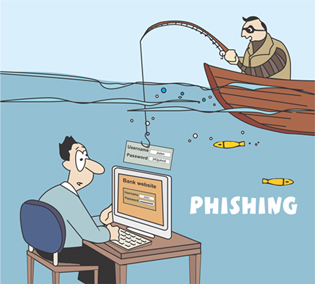
Phishing is a form of online identity theft in which fraudsters trick Internet users into submitting personal information to illegitimate web sites.
The word ‘Phishing’ is a neologism created as a homophone of fishing due to the similarity of using fake bait in an attempt to catch a victim (and hence the picture I have used in this post)
Phishing scams are usually presented in the form of spam or pop-ups and are often difficult to detect. Once the fraudsters obtain your personal information, they can use it for all types of identity theft, putting your good credit and good name at risk. One of the most widely used Phishing techniques is email spoofing, which necessarily means where the attacker sends a legitimate looking email to a victim, which can have links to websites which is malicious or is controlled by the attacker. Emails are also the most widely used Delivery mechanisms, that an attacker uses to deliver the Attack payload or the exploit itself. (I shall talk about Delivery mechanisms and the larger Cyber Kill Chain Concept in a later post).
These emails can also contain attachments like Word documents, Spreadsheets, PDF files, etc.. And embedding objects within these attachments, is one of the easiest ways of delivering the payload, because embedding objects is something that we IT Professionals also use frequently for legitimate reasons. So this is leveraged by attacker to his advantage.
As Amanda Stewart a FireEye says, in her recent post on their blog:
Phishing emails are one of the most common delivery mechanisms for malware authors. The attachments in those phishing emails have a variety of payloads. Well-known delivery methods include: exploiting vulnerabilities in the document program (e.g., doc, xls, rtf), using macros, or embedding user-clickable objects that drop payloads. Out of all these methods, embedding objects in the document is considered a “gray area” because both IT professionals and malware authors use this technique.
 
In the post, she also talks in detail about the Dos and Don’ts when embedding objects within documents.
Dos
 
  • If you must send someone an installation executable or even a form helper program, compress the executable in a password protected ZIP file, where the password is not easily guessable. Using a standardized strong password limits access to users or employees that need to access the program.
  • Educate your employees to not click on objects in documents without first confirming the source email address.
  • Enforce content filtering on web and email to prevent employees receiving executable files from the internet
  • Remove admin/local admin privileges to prevent employees installing new and unknown software onto devices.
  • Consider Advanced Threat Prevention technologies that can examine emails for sophisticated multi-stage droppers that evade detection of all email security gateways today. 
 
Here is the link to her post; a must read for IT Admins, and also for Security Analysts and Incident Responders: https://www.fireeye.com/blog/threat-research/2015/04/dos_and_don_ts_with.html
Picture courtesy: http://www.cyberoam.com

Digital Intelligence – Whitepaper by GCHQ’s Former Director

David Omand was the Director of GCHQ, from 1996-1997, and the UK’s security and intelligence coordinator from 2000-2005. If you don’t know already, the Government Communications Headquarters (GCHQ) is a British intelligence and security organisation responsible for providing signals intelligence (SIGINT) and information assurance to the British government and armed forces.
He has just published this new paper “Understanding Digital Intelligence and the Norms That Might Govern It.” The paper does have government’s perspective on the whole internet governance topic, a topic which has gained a whole lot of significance & attention after Edward Snowden’s revelations. But it is definitely an interesting read.
Executive Summary:
This paper describes the nature of digital intelligence and provides context for the material published as a result of the actions of National Security Agency (NSA) contractor Edward Snowden. Digital intelligence is presented as enabled by the opportunities of global communications and private sector innovation and as growing in response to changing demands from government and law enforcement, in part mediated through legal, parliamentary and executive regulation. A common set of organizational and ethical norms based on human rights considerations are suggested to govern such modern intelligence activity (both domestic and external) using a three-layer model of security activity on the Internet: securing the use of the Internet for everyday economic and social life; the activity of law enforcement — both nationally and through international agreements — attempting to manage criminal threats exploiting the Internet; and the work of secret intelligence and security agencies using the Internet to gain information on their targets, including in support of law enforcement.
 
He suggests that the norms applicable to digital intelligence, must broadly cover the following. This is definitely reassuring:
  • There must be sufficient sustainable cause
  • All concerned must behave with integrity
  • The methods to be used must be proportionate
  • There must be right authority
  • There must be reasonable prospect of success
  • Necessity
The full paper is available here:
Picture courtesy: www.cigionline.org

DigiCert Offers Continuous Monitoring of Digital Certificates to Defeat Fraud

This is a move in the right direction, considering the rampant use of compromised Certificates by hackers to obscure their real identity/motives.
Jason Sabin, CSO of DigiCert, said in an interview that the system is designed to give customers more control of and supervision over the certificates they have in use.
 
“In some large organizations, you can get people who need to get something done for a certain project so they go and grab a domain and don’t have time to go through whatever process they have in place for getting a certificate,” Sabin said. “So they do it themselves, but then the organization doesn’t know it’s happened, or perhaps it wasn’t done correctly.”
 
The CertCentral platform that DigiCert is rolling out allows for continuous monitoring of an organization’s certificates, and it also can protect companies against phishing and other attacks that play off of variants of their legitimate domains.
 
“We can look for people using certificates that are close variants of your domains, like using zeroes for the letter O or things like that,” Sabin said.
Certificate Transparency (CT) is possibly the best approach one can think of today, to detect and prevent unauthorised Certificate usage. But it also has to be noted that the key player behind this initiative, is Google, a company infamous for their thoughts/acts on User Privacy.
Dennis Fisher (@dennisf) has elaborated this in much detail at ThreatPost: https://threatpost.com/digicert-offers-continuous-monitoring-of-digital-certificates-to-defeat-fraud/112227
CT’s official site is also a great read to understand the concept further:
Certificate Logs:
Certificate logs are simple network services that maintain cryptographically assured, publicly auditable, append-only records of certificates.
 
Monitors:
Monitors are publicly run servers that periodically contact all of the log servers and watch for suspicious certificates.
 
Auditors:
Auditors are lightweight software components that typically perform two functions. First, they can verify that logs are behaving correctly and are cryptographically consistent. If a log is not behaving properly, then the log will need to explain itself or risk being shut down. Second, they can verify that a particular certificate appears in a log
Image courtesy: www.hotforsecurity.com

Log Monitoring for e-Commerce: Five Key Areas

e-Commerce has become the most important platform for a Retailer to sell goods. And as the number of financial transactions on e-Commerce sites dramatically increase year-on-year, the more interesting they become to fraudsters and adversaries. The key to detecting security anomalies in this communication channel, is to log every crucial piece of information.

Even from an Operational perspective, it is very important for an e-Commerce company to know exactly what they should log, so that their IT Operations team isn’t overwhelmed with the amount of information being processed and thrown at them for review.

The five key areas to focus on must be:

  1. Checkout: Log every step in the checkout process for errors and set alerts so you know if any part of the process fails.
  2. Shopping cart: Log all add-to-cart failures when they occur, send out an alert, and investigate the problem ASAP. There are a lot of intermittent problems that can create big headaches.
  3. Online catalog/ product page: Look for issues with specific product lines, markets, or other logical groups of products, especially if you have old data or legacy software integrations.
  4. Email signup: Look for both client-side and server-side issues because the business logic resides in both places.
  5. Login & registration. In addition to form submission and validation, focus on authentication and authorization logic as a whole. Log social media login errors, authentication and authorization cookies that may be out-of-sync, and errors from additional authentication checks.

Do checkout his post here: http://apmdigest.com/5-areas-every-e-commerce-business-should-monitor-using-log-data

Image Courtesy: http://www.softprodigy.com